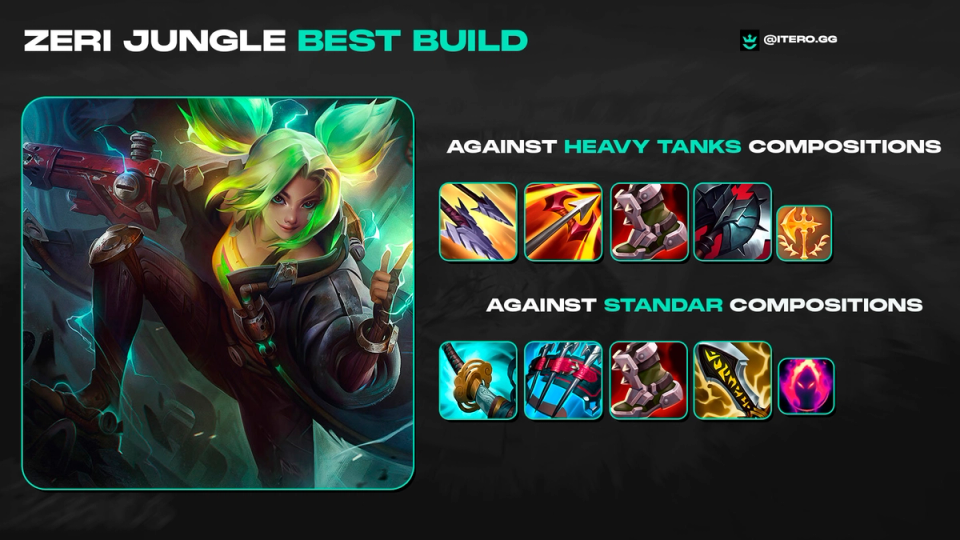
Why Zeri Jungle Is Secretly OP in League of Legends
Zeri Jungle guide: discover why this scaling ADC thrives in the jungle, with strong ganks, fast clears, and excellent late-game carry potential.

First impressions matter, and we felt iTero wasn’t giving new users a memorable experience. So, we spent the last month dedicated to making the app more approachable for a first time user.
Summary of Changes
Performance Improvements
Nothing matters more to players, or matters more to winning a game, than having their game run smoothly. We want iTero to feel like a feather. Or, more importantly, we don’t want you to “feel” iTero at all. A weightless application that sits seamlessly on top of (or next to) your League of Legends experience.
It’s not ever going to be possible to take no compute or memory at all, but it’s important to us we’re using as little as possible. Previously, a majority of players didn’t notice any difference in their game when running the app or not, but there was a small cohort of players who did. Those tend to be the people running older machines, maybe with 8GB of RAM (and some even with less!!). So, we wanted to help them.
A lot of the details for this change are very boring and very technical, but it’s safe to say they are working as intended. iTero now uses noticeably less RAM than before, and impact on performance should be barely noticeable, even on the lowest end machines.
However, if you’re still having issues we added two new settings to help:
UI Improvements
We’re pretty confident that once you’ve got used to iTero, you’ll stay with us for the long-term (and our data agrees with that statement). However, we understand that getting used to iTero can actually be a big step. There’s a lot of data and screens and features and some people just get totally overwhelmed by it all. It was even worse if you were logged out of League of Legends when you first tried the app, since most of the screens were filled with warnings!
So, we’ve cleaned up our UI. It should be simpler to navigate, especially the Macro Coach. We’ve also added some better "Logged Out” states, so that you can only navigate to working features until you log-in, rather than trying to guess which ones you might be able to play with.
We’ve also had League of Legends players review our translations, as the feedback was that some of our localisation (especially Vietnamese and Turkish) were too literally translated, which was understandable but looked sloppy.
Pre-Game Scouting Screen
I’m a data guy and I love data. I just want numbers and graphs. So, when I designed the initial “Scouting Screen” I filled it with numbers and graphs and I loved using it. It allowed me to make very analytical decisions about my game, and there’s a lot of people just like me who agreed.
However… there were also a lot MORE people who thought it was overwhelming and unusable! So, we’ve introduced human-readable tags to the pre-game Scouting Screen, and only kept the basic statistics.
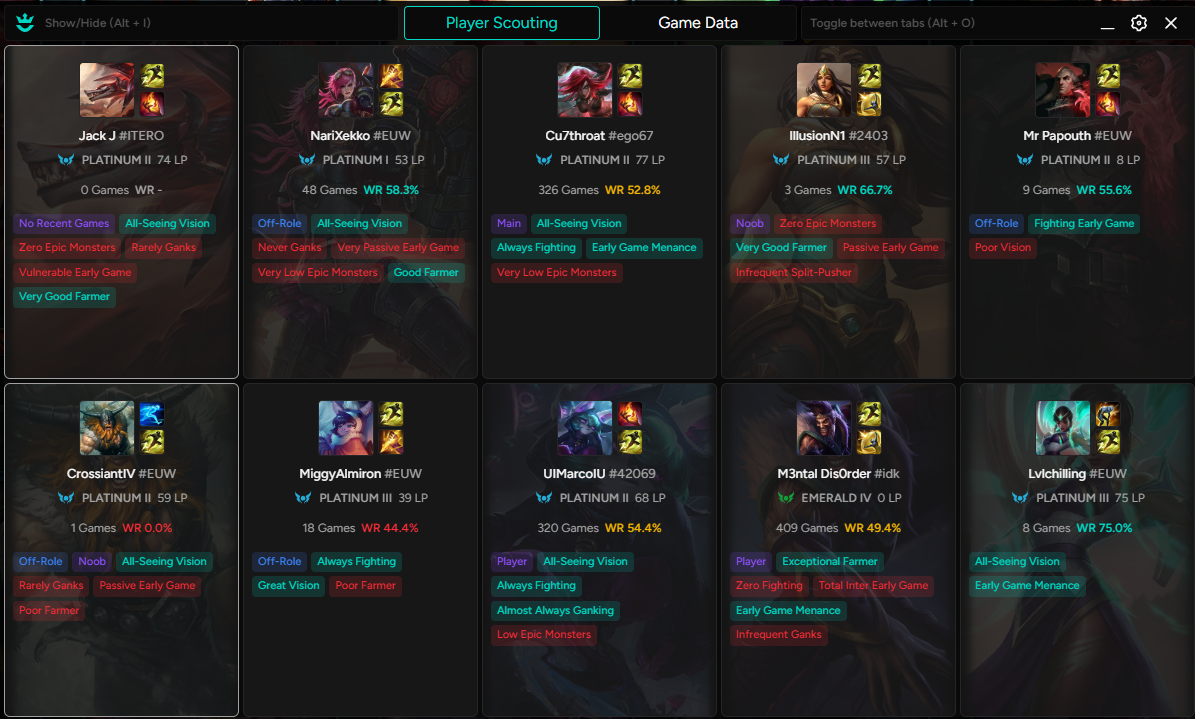
This immediately proved more popular than my stat-heavy approach, so we switched it to be the default view. If you preferred the old version, you can switch it back in the settings menu.
What’s Next?
We’re going to take a brief break from Solo Queue and take another stab at ARAM. This will include a completely redesigned drafting screen, as well as the introduction of a (non-data driven) Augment Tier List.
Our goal here is not the same as Summoner’s Rift. We’re NOT building an AI-powered macro coach to hyper-optimise your ARAM win rate. Instead, it will all be about exploration. Find new, fun builds to experiment with. Minimal numbers, maximum fun.
Here are some other articles that may be of interest.
Zeri Jungle guide: discover why this scaling ADC thrives in the jungle, with strong ganks, fast clears, and excellent late-game carry potential.
After years of being one of the most outdated champions in League of Legends, Riot updated her in patch 26.6. The result isn’t a completely new champion, but it is a version that plays differently enough to make a lot of players question what the right build actually is.
Comparing and ranking the most popular apps for League of Legends.