
Building an Optimal Champion Pool
How to build an optimal Champion Pool in League of Legends (LoL), what size it should be, why it's so important, and an AI tool to help you get started.
I have spent 7 years building apps for League of Legends, and, full disclosure, I still contribute to iTero, an app which I have highly recommended below. My opinion is based on years of product comparisons, testing and user research.
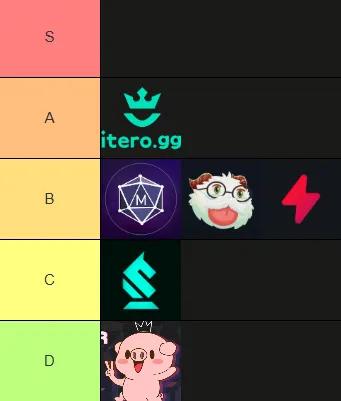
In 2025, The iTero AI Coach has taken the crown as the best League of Legends app available on the market, proven by its outstanding reviews and skyrocketing installs. It’s not only well-rounded, with at least a Good rated implementation of all the standard features, but also has the best Drafting tool on the market. The cherry on top is that it is one of the only apps on the market that doesn’t require Overwolf to run, and showcases the benefits of this with it’s low RAM footprint.

The big three apps, Mobalytics, Porofessor and Blitz remain the most popular of the applications, but they’re losing their monopoly over the app ecosystem as they continue to fall behind in innovation, rising performance issues and looking increasingly dated. I can’t differentiate between the three, as they all have strengths in some areas and weaknesses in others.

iTero is a relatively new app that is quickly becoming a community favourite. It’s well-rounded, offering all of the features users have come to expect, but stands out from the crowd with its flagship “AI Drafting Coach” and “AI Macro Coach”. Available as a Standalone Download (i.e. without Overwolf) gives it the advantage in performance. The only downside is that it’s clearly designed for players familiar with the game, and could be a little overwhelming for those new to the game.
Link: https://ITERO.GG
Installs: 527,000, although not the biggest app out there, it’s a serious increase since 2024.
User Reviews: 4.4 / 5, making iTero highest rated app on the marketplace (for those above 500,000 installs). Reviews regularly speak of the quality of the Drafting Tool and the speed of improvements.
Does it require Overwolf? No. Although the iTero AI Coach is available on the Overwolf store, you can download a Standalone version from the website.
This is where iTero shines. It’s flagship tool, an AI Drafting Coach, uses custom trained models to recommend Champions that give you the best win rate for your team composition, and explains why. This feature gives you the confidence in your Champion choice, rather than just ranking by win rate.
A standard feature in all apps, with a twist. iTero not only recommends the best items for your Champion, but recommends them based on the enemy team composition. It even adapts to recommend anti-heal or anti-shield items, as required. My only minor criticism is the builds lack variety at times, often recommending multiple “options” that are just the same build in different order.
iTero is designed for no-nonsense competitive players, and the Scouting tool is the epitome of this approach. It gives you the raw numbers across the important metrics that impact your decisions, and no more. Enemy support invades a lot? Better cover it. Enemy Top Laner plays aggressively? Better play safe. Perfect for grinding out tactical wins, but may be overwhelming for newer players, where other apps will offer simpler, human-language notes, like “Not playing their main” or “On a losing streak”.
The core to any companion app is its overlays and iTero has sleek and simple UI to keep you on top of everything going on. It has all the standard parts, but also neat features like a Baron timer that not only shows you how long the buff has left, but who still has it active. It’s also stayed on top of patch notes, with a timer to show you when the Nexus towers are respawning, particularly useful for those clutch late-game decisions. The only difference to other apps is that it doesn’t overlay it’s Gold Tracker on top of the leaderboard, but instead displays a separate table— not a problem perse, but a variation to other apps.
It also has one of my favourite and most valued features across any app: A Match-up Analysis, that is simple yet powerful. For each level, it provides the statistics on how the 1v1 (or 2v2) match-up usually goes. From this, you can quickly get a feel for how you should be playing the early game. Do I win trades? Would I win an all-in? Do I need to play ultra-safe? Highly recommend for players expanding their Champion pool.
The claim of iTero having over 400 statistics per-game seems unbelievable at first, but when you break it all out into phases you can see the sheer amount of data available, from the standard KDA metrics, to the rarer “Epic Monsters Stolen”, “Kills on Enemy ADC”, or “Gold Given from Bounties”. If you’re a stat nerd, or serious about improving, it’s great — for newer, or casual players it’s probably a little much. It would also benefit from highlighting important statistics graphically as a way of quickly understanding the game in a glance.
Similar to the post-game analysis, iTero offers A LOT of data to go through. It’s great for verifying your assumptions (i.e. “Do I die a lot to Junglers in the early game?”, or “Am I warding enough?”), and the simplified summary gives you a handful of useful charts to glance through. Again, great for competitive players, but easy for a newer player to get lost in the numbers. The “Flame Me” / “Compliment Me” feature is also a nice unique find, and can say some very funny (and truthful) things about your account.
The real novelty of iTero is the AI Macro Coach, which uses all the data gathered about the account to determine the Top 3 things a player needs to do to improve. A unique application of AI to help competitive players really nail down what to work on. It’s still fairly new, and the UI/UX is still quite simple, but does the job for players who want a quick unbiased data view of their account.
iTero is one of the better looking tools, with a modern feel and an obvious brand. The Drafting is particularly polished and feels natural to use alongside your solo queue games. It has all the information you need and is perfect for a competitive player looking for every edge they can find. The one drawback is that casual, or new players, will find it difficult to navigate through the statistics, which assume a base level of knowledge to use them.
A clear advantage for iTero of not requiring Overwolf is you don’t have an extra program running at the same time as the app you want, and there’s obvious performance benefits to that. iTero is also built on Electron, which as a modern framework provides a clear advantage to the speed and RAM usage. It does have more overlays than most apps, and each one causes a small incremental increase in RAM, but even at full-blast it never seems to exceed 600–700MB.
The free version of iTero does contain ads, but in most places they are limited to one small container that doesn’t ever feel intrusive. A subscription is available to remove the Ads, which also shuffles the layout around to make use of that extra space, which is a nice touch.
It’s the original, and it’s the biggest. Porofessor is likely the most recognised app for League of Legends. However, the market has evolved rapidly in the last few years and Porofessor is falling behind. It’s recent reviews show a surge of error reports. The Scouting Tool as a feature remains one of the best implementations available, but you’ll be left wanting in other most other areas. Streamer Mode has also impacted the app more than most.
Link: https://porofessor.gg/
Installs: 16,100,000. This is, by far, the most installed League of Legends app on the Overwolf Store, and probably, anywhere. It’s been around forever, starting as a website and then launching the app over 7 years ago, it’s accumulated a huge number of users since then.
User Reviews: 4.1 Stars. A highly commendable score for the sheer size of the userbase. However, the latest reviews are a real mix, bouncing between 1 stars and 5 stars. The top complaints seems to be down to reduced reliability, with several references to error screens and 404s. Porofessor was hit the hardest byRiot’s recent addition of Streamer mode, which, when enabled, kills their core feature (Scouting). Their founder and sole-developer also left the business following the acquisition, which could contributing to the worsening of its reliability and a stagnation compared to other founder-led apps.
Does it require Overwolf? Yes. Porofessor still requires Overwolf to install.
Although they do offer a Drafting Tool, it’s one of the weakest parts of the app. You are given a choice of 5 Champions, and there’s no context as to why any of them are good. From playing several games it seems to just offer the meta option each time, without adjusting for the enemy composition. The one good part though is a nice summary of your Team Comp, with notes like “Good engage” or “Splitpushing Potential”.
Porofessor offers the basics with a single Build set recommended, but it can also can make different suggestions based on the 1v1 match-up you’re stepping into. The logic seems to be based purely on total, overall win rates in high Elo, which is a standard approach and works well enough for the average player. Nothing innovative, but a good base implementation for builds.
This is Porofessor’s main feature. All the basic information about all of the players, like win rates, ranks and role preference (at least, for those who don’t have Streamer Mode enabled). The best part though, are the labels they add. “Aggressive Laner”, “OTP”, “AutoFilled”, “Bad Vision”, “Good mood”, “Newbie”, “Waking up”. Although sometimes it’s hard to interpret what you’re meant to do with that information, whether you’re just starting the game or an experienced veteran, a quick scan of this screen gives you a nice flavour for the game.
Porofessor is not as complete as its competitors here, but it does have the two core features that all apps need. Gold tracking, to show how each lane is getting on throughout the game, and CS/m tracking, which acts as a nice comparison tool to see how you are performing against other players in your Elo. I also like the small “next item” overlay, just showing you what you’re meant to purchase and how much it costs, which saves you opening the shop to check. Again, nothing innovative, but does the standard stuff well.
It’s mostly only the basic stats, but they’re nicely laid out. Scoreboard at the top, Gold Lead and Damage Dealt as a graph, then some core statistics at the bottom. The data is simple and limited, but all you would need as a casual player. Again, the best differentiator here is the labels they add, like “Great roams”, “High KDA”, or “Bad vision”, although their tucked away at the bottom of the screen, which is a shame as they’re the interesting addition.
It’s just the basics again here, with nothing more than KDA and Win Rates. You can’t go very deep into your account, but it does show you the labels you’ll get in the scouting tool — and there can be something valuable about knowing that they think I’m a “Chain Loser” who has a lower win rate immediately after a loss! Note to self: take breaks after losing.
A key feature, more popular on their website than the app, is their “Live Game” tab, which allows you to filter games that are currently on-going, which you can then jump in and spectate through the client. Perfect for finding and learning from OTPs and/or Pros.
Porofessor really doesn’t offer much in terms of design, still looking extraordinarily amateur and dated for an app acquired for €50m. The layout is fine, offering important information upfront and the labels throughout do a lot of the heavy lifting, drawing eyes and keeping things simple, but it’s far from modern.
Porofessor is fairly limited on its utility, but due to its age and the requirement to run Overwolf as well, it performs worse than it should. There weren’t any major RAM spikes, but I did have a couple of games where their Scouting Tool was returning errors, something mentioned in their recent reviews.
There are some limited ads for free users, with a paid option to remove them. The ad units are fairly small and don’t feel intrusive.
One of the “Big Three” apps, alongside Porofessor and Blitz, and of the three it’s the most complete, offering a fairly good selection of features, and innovative in places. It’s also one of the better designed of the older apps, and hasn’t fallen behind too much in most areas. However, it is also the worse performing of the apps I have tested. RAM spikes, crashes and unexplained bugs, all paired with creeping Ad coverage, which explains the rapidly reducing User Rating (now only 3.6 Stars). This app would be a top contender if it wasn’t so poorly optimised.
Link: https://mobalytics.gg/
Installs: 4,390,000.
User Reviews: 3.6 Stars. This makes Mobayltics one of the worst reviewed for apps of its size, and it gets worse if you look at just the reviews this year, which mostly come in as 1 star. The main concerns are freezing, bugs, and an increased number of ads.
Does it require Overwolf? Yes, Mobalytics requires Overwolf to be installed.
Similar to many of apps, the Drafting feature feels like a dressed-up tier list, with the recommendations looking very similar to the top 10 highest win rate Champions of the patch.
However, an interesting feature in their drafting is the “Cheat Sheet” which offers you tips about your Champion and your lane opponent, as well as a “Game Plan” to follow, usually based around whether your Champion gets ahead early (push your lead) or falls behind (play safe). However, the information did feel overwhelming for new players, yet somehow also irrelevant for experienced players. Some parts were useful, particularly around how well each team scales, but it shouldn’t need this much screen size to tell me.
One of the strongest aspects of the tool was its build recommender, which gave you multiple options to choose from (Popular, Win Rate, Alternative & Off Meta), as well as details about situational items that you may want to swap into the build. You could also copy top players, or take builds where the data is pulled based on the specific match-up.
It’s missing a more sophisticated system to offer a calculated recommendation that you can have confidence in, but the optionality was a welcomed addition.
Offering a very similar feel to Porofessor, the Scouting Tool has the basic statistics accompanied by it’s own useful labels like “First Game”, “Vision Focused”, or “Early Farmer”. The downside was that a lot of those labels were hard to interpret without hovering over them, like “Mobile Threat”, “Wrecking Ball”, or “Ultimate Predator”, which compared to Porofessor made it slower to read.
A standout aspect to the tool is the number of features available to you whilst in-game. There’s so much to choose from that you need three short-keys set-up to access them all. It has all the usual timers and Gold Difference trackers, but they are accompanied by a Match-Up Guide (same from the Drafting Screen) and a Game Summary which gives you further information about how the game is going.
Although I think the matchup guide has its value for new-ish players (like reading up on the enemy Champions abilities) it was too much text for regular use by experienced players, and I never found myself wanting any of the information from the Game Summary, but there’s certainly a lot of features to use here.
The biggest downside to the Post-Game Screen was that a majority of the information on display here is available through the League client directly. There are two exceptions to this. The first being that each player is given a position from 1st to 10th, although the attribution seems unfair to support players who will very rarely find themselves anything but last place for their team, which would indicate a fairly basic calculation based on Kills, CS, and/or Gold. The other notable, and quite nice feature, is the awards. This is always given based on CS, Damage, Gold, KDA and the mysteriously calculated MVP title — again, poor supports!
A bread & butter account statistics page that will give you a glimpse of the standard numerics like KDA, win rate and CS/m. They do have a neat looking radar chart that assigns you categorical scores for things like “Consistency” and “Versatility”, but vague titles on what is already a tough-to-interpret graph gives it a feeling of style over substance.
They do have a novel calendar that colours days by your win rate, which can either be depressing or insightful depending on how your year has been.
Hidden behind a paywall are two additional features with a lot of potential. First, a VOD analysis tool to help you identify clips of your gameplay that could be helpful in understand certain patterns. Second, a “Challenges” section that is designed to give you improvement areas to focus on and sets measurable targets to hit. For example, getting a solo kill, or dealing more damage per minute. It’s not entirely clear how it links to winning games, and I don’t have a huge amount of faith in the systems ability to work out how to improve, but it’s a novel and I could see people enjoying for the grind of daily quests.
It looks and feels modern, and although the number of features and information on any screen can be overwhelming, you do get used to finding the important parts. The visualisation of data is basic but well executed in the most parts. It’s also by far the widest of the apps, filling an entire screen throughout.
A combination of being an older app, feature bloat, and the need to run Mobalytics through Overwolf makes for a very poor performing app. My RAM usage sat at around 1,400MB, but often jumped up to closer to 2,000MB. If you’ve got Mobalytics, Overwolf, League of Legends and a browser running on a machine with less than 16GB of RAM, you’ll notice it. I also ran into the occasional freeze, which judging by the recent Overwolf reviews is a widespread issue.
The sheer amount of data and information being shown also means they’ve optimised for wide screens, so smaller laptops will struggle to get everything in one place. If you’re on a low end machine, this is NOT the app for you.
Mobalytics have a pretty wide stack of ads that take up a chunk of the side of all screens, and in some places even pop-up at the bottom. Due to the large app size they are mostly ignorable, but it can be distracting in a lobby to have three simultaneous videos playing.
The major differentiator of Blitz is that it’s one of the only major apps that is not available on the Overwolf App Store. It has a pretty basic implementation of all the key features you would expect with a third-party app. It doesn’t do anything exceptionally well, and there’s no innovation to help it stand-out, but what it does do it does well. The design is professional enough and there’s no noticeable performance issues. However, by far the worst part about Blitz is that they have Ads everywhere — which is painfully distracting and frustrating at times. Without the overwhelming Ads, it would have been a contender.
Link: https://blitz.gg/lol
Installs: ~8 million+, sourced from their LinkedIn, although this number is unverifiable and incomparable to the others as they do not appear on the Overwolf store.
User Reviews: 2.3 / 5 (TrustPilot.)As Blitz is not on the Overwolf store the reviews were instead taken from TrustPilot, which makes it difficult to compare with the other numbers.
Does it require Overwolf? No. Blitz is one of the few apps entirely outside the Overwolf App Store.
As far as the functionality of recommending a Champion, it ranks as one of the worst. It gives 6 suggestions, confusingly laid out, and with no explanation or context as to why one may be better than another. During my testing it exclusively recommended Champions ranked “S” or “A” in their Champion Tier List, or in other words, it feels no different to picking based on average win rates.
There are, however, a few redeeming factors that cover for the questionable suggestions. First, it displays known Synergies with all Champions locked in the lobby, which although doesn’t feel like it impacts the recommendations, does make for a useful sense check.
Secondly, there is some neat graphical breakdowns of the team comps, particularly useful to draw your attention to how the damage composition of both teams is unfolding. Too much AP on your team? Good reminder to pick AD. A lot of AD on the enemy team? Malphite angle. Again, it’s a shame that it doesn’t feel like the recommendations being made are taking this information into account.
The item recommendation system is one of the strengths of the app. It offers a variety of builds, and provides the supporting data to make the decision. It gives options based on the match-up, rather than aggregate data. You can import builds by Pros or Streamers from their recent games. It also gives situational items to bring into the build, although without explanation as to why. What is missing is a more robust systematic recommendation system that tells you what they think the best choices are, rather than leaving you to decide between Generic Build or the 1v1 Match-up Build.
An average Scouting Tool, with win rates, KDAs and a drizzle of labels (“Autofill”, “Dies Early”, “Bad Laner”, etc…). It does give a breakdown of each Champions expected damage profile, which can help newer players. It’s generic, but serves its purpose.
Again, in-game, it’s standard and without much inspiration. It has the three features most common in every app: A CS/M tracker, Timers, and a Item Value/Gold Tracker. A nice change, not common in every app, is overlaying the Item Values directly onto the in-game scoreboard, rather than having it’s own separate UI.
Although the basic data is standard (i.e. all the data you get from the match summary in the League client itself), they do something very novel by providing an overall score for Combat and Farming, where your gameplay is categorised into a title like “Vanguard” (for taking damage) or “Marksman” (for dealing it), and then the top 3 statistics that contribute to that title. On top of that, they also provide information on each of your deaths, such as the estimated Gold Swing and Win Probability Change. If you’re pairing this with VoD reviews (which aren’t directly built-in to the app), it could be an interesting method to understand your mistakes. The only issue is it sometimes acts strangely, like the following quote:
“Nice you only had 9 deaths increasing your chance to win by 13.6%”.
Given the novelity of their post-game summary I was expecting a more fleshed out Account Statistics page, but I found it lacking. There really isn’t any statistics here at all, and none at all graphical. It gives you a breakdown of your win rate per role and per Champion, but that’s really about it. You learn nothing new, and the data isn’t particularly well organised, either.
A theme from Blitz seems to be a lack of ingenuity in the features. If I was to highlight anything outside the standard, they do seem to have the best implementation of “Arena” statistics, although I really was scraping the barrel for that one.
A solid, modern design with solid branding and the basics nailed. The UI/UX feels professional and there’s an intuitive feel to most of the app. It may be the most generic of the apps, but it certainly delivers a decent visualisation of all the important parts.
Sitting at about average the performance is acceptable for an app with their feature set. I did notice some memory leak during longer sessions and the occasional unexpected RAM spike. However, it was without noticeable bugs, errors, or crashes, so outperforms an embarrassing number of apps.
The sheer amount of data and information being shown also means they’ve optimised for wide screens, so smaller laptops will struggle to get everything in one place. If you’re on a low end machine, this is NOT the app for you.
The worst part about Blitz is the Ads, which seem to be creeping over more and more of the screen every time I return to try it out. We’re now at around 1/4th of the width of the screen, across all their screens, and now with the occassional banner ad popping-up at the bottom. The paid option can remove these Ads, which if you enjoyed the app enough would be worth it given the amount they show.
The worst of the apps I have tested so far, offering the bare minimum in terms of functionality, and the one feature they do offer (Drafting) is by no means advanced. The design is very poor and amateur, and its small size is not helped by Ads taking up 40% of the screen space at times. From reviews, it seems they’re initial success came from offering a “Queue Auto-Accepter” which has subsequently been removed.
Link: https://www.overwolf.com/app/yiome-team_advisor
Installs: 394,000. A relatively new app that saw a sharp increase in installs in 2024, but has slowed down since then.
User Reviews: 3.7 Stars, and from the recent reviews it looked like the app was being used as a “Queue Auto-Accepter”, a feature Riot recently clarified shouldn’t be permitted and was removed from all apps, causing a stream of 1 star reviews (i.e. “installed just for auto accept. You removed the only purpose of me having this app.”).
Does it require Overwolf? Yes, Team Advisor is only available through Overwolf.
As per the name, the drafting tool is the core feature in Team Advisor, and it executes it fairly well. You can see all the possible picks and their app-assigned scores throughout the draft. For each pick, you can see the pairing score with every other Champion, which provides the context as to the scores they’re providing. These picks update enough to give you confidence that they’re not just providing the generic tier listed picks, too. You can also choose whether you’d rather a “Meta”, “Balance” or “Matchup” optimised pick — although it’s not clear what difference this makes. You also can get the Damage Profile of your team, updating as the draft unfolds, which can help drive your pick if the damage is too heavily favoured one way or another.
After playing several Ranked games with the tool I found it was too sensitive to the known information, and seemed to ignore the unknowns. In other words, if you were early in the draft, it seemed to weigh it’s decision heavily on the few Champions that were already locked. This means that quite often a pick was rated extremely highly when I locked it because it countered the one known Champion on the other team, and was completely useless by the end of the draft.
It provides one option only, and it provides no context for it. The option seems to be based on generic overall win rates of the Champion, which means it performs poorly in a lot of scenarios. For example, Malphite usually has a higher win rate when playing full AD comps, which means his highest win rate build has a lot of Armour — but what happens if the enemy team is full AP? It’s still better than no build recommender, but barely so.
Team Advisor has no Player Scouting Tools.
Team Advisor has two overlays currently. The first being Jungler Timers, which are not only unnecessary given they are now built into the game, but their timers were constantly incorrect. That meant I had two timers in the same space for each camp, both showing sometimes wildly different times. Very poor!
The second part was an overlay providing summary information about the game, most notably the stats of each Champion at any time — such as Attack Speed, Ability Power, Armour, etc… I can’t say I found this information useful, and it was worsened by having an Ad taking up almost half the overlay, discouraging any use.
Team Advisor has no Post-Game Analysis.
Team Advisor has no Account Statistics.
Team Advisor has no other tools of note.
A very poor design that feels clunky and amateur throughout. The basic nature of the app means you aren’t overwhelmed by the design, and the information in the drafting tool is actually more intuitive than many of the other, more sophisticated apps, but it’s still in desperate need of a make-over.
Performance In-Game: A [~800MB]Given the lightweight nature of the app the RAM usage was relatively low, even with the added expense of running Overwolf simultaneously. The occasional UI bug was minor and unimpactful to the experience, with no notable impact on performance or app quality.
Although the size of the Ads were standard, the app seems purposefully designed to be small enough to run alongside your game client on a single screen, which means they all look unreasonably large. At some points the Ad space came close to 50% of the app, which is an unacceptable level of disruption.
Another scrappy upstart that is catering to organised teams, particuarly on draft. Although it has some utility for a solo queue players, it’s limited to Drafting, with none of the other features you’d expect in an app. The drafting for solo queue also felt questionable, putting far too much weight on creating a stylistic team. The design is fantastic, by far the nicest looking app out there. This could easily find itself competing with the larger apps once it develops a more rounded feature set, until then I would avoid unless you are regularly playing in team environments.
Link: https://procomps.gg/
Installs: 463,000, another new player on the market has seen a steady rise in installs since it’s release.
User Reviews: 4.2 Stars, a very solid review for its size and seems to also be a consistent number that tracks with the recent reviews.
Does it require Overwolf? Yes, you will require Overwolf to run ProDraft.
Another app with a focus on Drafting, ProComps does a fairly good job of presenting it’s recommendations and the reasons for them. It also includes a coach summary, which contains useful tips like “You need to pick a Frontline”, “You need more CC”, or “You don’t have enough Physical Damage”. The recommendations it provides then match to these requirements, such as recommending K’Sante because he is an AD Damage Type Tank with CC. It also shows whether they have Good, Bad or Synergist match-ups with the full team comp, visualised simply and clearly.
However, after a lot of testing I found the recommendation system to be poor. For example, in one game the enemy team picked Irelia, Kai’Sa, Tahm Kench and Yasuo. It recommended I pick Aatrox, because he provides Waveclear, CC and is a Frontline. However, Aatrox is a terrible match-up into Irelia, especially in Elos below Diamond. To me, it feels like the model is always trying to shoe-horn explainable recommendations(“Pick Aatrox because his 3 strengths fit well with your teams requirement”), even when they’re objectively bad statistically (getting crushed in lane by Irelia). This then highlights the second issue, which is none of the underlying data is shown. It may tell you a match-up is bad, but you never have a clear sense of how bad, or where that data is from.
With that being said, I can see this tool being effective in more strategic tournament games in which designing a well-balanced team comp and understanding it’s strategic weaknesses is vital. Especially since statistics like Solo Queue Win Rates become less relevant in professional games. It’s also the only app that lets you get recommendations for every lane, rather than just your own. Great for team play, not so useful for your average solo-queue.
ProDraft does not provide information on items or builds to choose.
ProDraft does not provide scouting information on the players in your game.
As of today, ProDraft still does not provide any additional overlays. They do have some in-game tips, but these are more connected to the draft and provide somewhat useful analysis on each teams scaling throughout the game. However, it lacks the majority of standard overlays or features in-game.
ProDraft does not provide any post-game analysis or statistics.
ProDraft does not provide any statistics about your account.
ProDraft really is what it says on the tin, a tool where it’s most exceptional feature is designed for Professional Drafting. You can create a team, assign a Champion Pool (and relative comfort) for each player and then mock drafts to your hearts content. This is a great tool for amateur teams who want to spend more time understanding potential drafts whilst getting high-level understandings of the win conditions and weaknesses to play around.
An exceptionally well designed application that looks and feels professional throughout.
Due to the limited functionality of the app it comes in about average in regards to in-game RAM. The app feels fine and I experienced no performance issues or bugs.
A standard implementation with a side bar dedicated to 400px video/display Ads. The app size is proportionate to the ads and therefore they never feel overly intrusive.
The overview above was done from the perspective of a player who wants to use one third-party application to play alongside League of Legends standard Summoner’s Rift game mode.
However, there are a few apps out there that don’t quite hit this definition, but certainly offer some cool individual utility. Here’s a special shoutout to…
Companion Apps are third-party programs that are designed to be run alongside League of Legends. Their utility range, from accepting the queue on the toilet (see Mimic) to using AI to optimise the drafting phase (see ITERO.GG), and everything in between.
At the time of writing this article, all the apps I’ve referenced in this article are compliant with Riot’s Terms & Conditions, listed below:
Greetings players, These terms of service (the " Terms") set out the terms and conditions by which Riot Games offers…
Most apps need to go through an application process in order to get an API key. Riot will “approve” these applications, but they are basing that on the details in the application. Therefore, Riot are careful never to officially and publicly “approve” apps, since they can’t control the features these apps launch in future.
Overwolf work closely with Riot to ensure all apps available on their app store (all the apps above, except Blitz) are compliant, and any issues Riot have are usually resolved quickly, otherwise the app risks being de-listed and losing their API key.
However, there are some nefarious apps out there. That includes things like giving unfair advantages through scripts and aimbots, or changing the look of the game with fake re-skins. You won’t be able to find them on the Overwolf store, and they won’t make themselves easy to find (since Riot are quick to shut them down). These apps are not only not approved, but Riot strictly forbid the use of them.
Again, the applications listed above are (at time of writing) all compliant with Riot’s terms & services and if they control your app in any way (such as automatically pushing Builds to your shop) then they will be doing this through the official Riot methods. Therefore, it is highly unlikely that any of these apps will impact Vanguard.
There are apps that exist which are intended to give you an unfair advantage and these are likely to be caught by Vanguard, however, these apps are not on the Overwolf store and they will not be easy to find by accident. Avoid anything that feels like cheating.
As all the applications above are (at time of writing) compliant with Riot’s terms & services, they present no risk of account bans. Even if an app was to offer a feature that broke Riot terms & services, then it will be the app that gets punished, either by losing their API key, or getting delisted from Overwolf. There are currently no substantiated cases of users getting a ban for using an app listed above. There is a common misunderstanding where users are banned with the warning “cheated by using third-party tools”, however, this is because this is the message shown when someone has bought an account which was levelled by bots, a common ban reason, and has nothing to do with any of the apps listed above. These bot bans come in waves, which means it’s not always obvious why it happened.
These third-party apps will use a combination of the official LCU and Riot API. This allows the app to pull some limited information from your client, like the name of the account you are logged into, as well as interacting with the client, such as pushing a build to your Item Shop. This information can then be sent to the Riot API for additional information, like your match history.
There is a wide variety of features that can be offered, which are categorised into the following:
Here are some other articles that may be of interest.
How to build an optimal Champion Pool in League of Legends (LoL), what size it should be, why it's so important, and an AI tool to help you get started.
How could an AI Coach work for League of Legends (LoL)? What data would it need? What models could it use? How could it help a player get better?
Does AI have the ability to shape the future of esports? Have its potential performance benefits been overhyped? Where does it differ from traditional sports?